Free A native Mac app for X
All of X, in columns.
Orbit puts up to eight X columns side by side, keeps your Messages pinned to the edge and has Orbit Cards built in. It's the real x.com, signed in with your own account, in a window made for a big screen.
Free · Version 0.5.1 · 4.8 MB · macOS 14 Sonoma or later · Apple silicon
01 Columns
Eight columns, edge to edge.
Open Home, a list, a search, a profile or a single post, and keep them all on screen at once. Drag any column to its own width, from 320 to 900 px, pin the ones you always want to either edge, and stack two in one place when you want more on screen. If you miss TweetDeck, it's the same idea as a native Mac app, built on the regular x.com.
- ⌘-click any post or link to open it in a new column⌘click
- A Posts only switch on profile columns hides the header
- Zoom each column on its own⌘=⌘-
- Reopen the column you just closed⇧⌘T
- Move a column left or right⌥⌘←→
- Pin a column to the left or right edge, so it stays while the rest scroll
- Stack two columns one above the other in a single place
02 Panels
Messages stay in reach.
Messages and Notifications open as panels. Keep one among your columns, or pin it to the left or right edge so it stays put while you scroll everything else. Drag its edge to resize it, from 300 to 640 px.
Messages ⌘ 2
Your DMs next to the timeline, not in a separate tab.
Notifications ⌘ 3
Mentions and replies, always one glance away.




03 Orbit Cards ⌘4
Turn your X into cards.
Orbit Cards lives in its own panel. It makes images from your X activity that you can post or save, without leaving the app.
- 01X headers made from the people you talk with most
- 02Monthly recaps of what you posted and who replied
- 03Milestone cards for follower counts and streaks
- 04Rings around your profile picture
- 05Any post turned into a clean image
- 06A card for any reply, from the Orbit button in X's reply box
- Open itPress ⌘4 in Orbit, or go to orbitcards.app in any browser.
- Pick a cardEnter your @handle. The free tools need no account.
- Share itSave the image or post it to X.
Signing in with X or Google is optional and unlocks the Studio. Orbit Cards is a separate service with its own privacy policy and terms.



04 Chrome extension New
A card in every reply box.
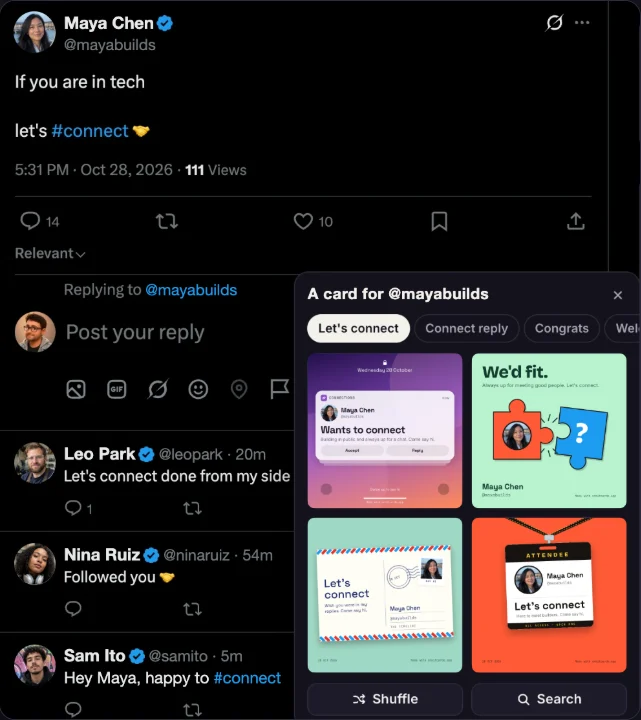
Orbit Cards is now on the Chrome Web Store. Someone posts "let's connect" or "just hit 1k followers", you open the reply box, and four cards are ready with their name, @handle and photo already on them.
- Click the Orbit button next to the photo and GIF buttons
- The panel opens on the kind that fits the post: Let's connect, Congrats and so on
- Shuffle for four more, or search all of the designs
- Pick one and it's attached to your reply. Edit the note, the look or the size
- You press Reply yourself. It never posts, replies or follows for you
The card picker is part of Orbit Cards Monthly: $4 a month, full refund within 30 days. It uses your orbitcards.app account. The button does nothing until you click it, and there are no analytics or ads. Using the Orbit app? The picker is already built in.

05 Keyboard first
Press ⌘K and type.
Super commands open columns, profiles, searches and any x.com page. Every toolbar button is also a ⌘K command, so you can leave the mouse alone.
06 Make it yours
Set it up your way.
A toolbar with only what you use
Pick and order the buttons: Home, Explore, Bookmarks, Lists, Drafts, New column and more.
X's left bar, or not
Columns get the full width by default. Keep X's navigation bar on Home if you like it, and its places open as new columns.
Orbit themes
Six color themes for Orbit itself, in light and dark. X's pages keep X's own look.
Pin, stack and resize
Pin columns to either edge, stack two in one place, and drag each one to the width it needs.
X's own light and dark
Orbit follows the theme you picked on X.
Several X accounts
Switch between them in one click.
 You@you
 Studio@yourstudio
Ideas for new columns
Not sure what to open? Orbit suggests searches.
07 Private by design
It's just x.com, on your Mac.
Orbit shows the real x.com in WebKit, signed in with your own login. What you read and write stays between your Mac and X.
AIOrbit has no AI features. Nothing you read is sent to a model.
X APINo API keys, no developer account. Orbit shows the website, the same one Safari gets.
AnalyticsNo tracking and no telemetry. Orbit doesn't count what you do.
Post collectionOrbit never reads, caches or uploads your timeline. Your columns and settings stay on your Mac.
- Built with
- Native SwiftUI
- Runs on
- macOS 14+
- Shipped
- Signed & notarized
Is Orbit free?
Yes. Orbit is free to download and use. There's no trial, no subscription and no account to create.
Does Orbit read or collect my X data?
No. Orbit shows x.com in Apple's WebKit, signed in with your own login. It has no analytics or tracking, and it doesn't collect or upload your posts. WebKit keeps your X login on your Mac. Read the privacy policy.
Does Orbit use the X API?
No. Orbit shows the X website itself, so you don't need API keys or a developer account, and nothing is billed per post.
Which Macs does Orbit run on?
Orbit needs macOS 14 Sonoma or later on an Apple silicon Mac. It's a native SwiftUI app, signed and notarized by Apple.
Can I use more than one X account?
Yes. Add as many X accounts as you like and switch between them in one click from the toolbar. Each account keeps its own login on your Mac.
What is Orbit Cards, and do I need an account?
Orbit Cards turns your X activity into images you can share: headers made from the people you talk with, monthly recaps, milestone cards, profile picture rings and posts as images. Open it in Orbit with ⌘4, or at orbitcards.app. The free tools work as a guest. Signing in with X or Google is optional and unlocks the Studio.
Can I pin, stack or resize columns in Orbit?
Yes. Any column can be pinned to the left or right edge, where it stays while the other columns scroll, and any column can stack under the column on its left, two to a place. Drag a column’s right edge to give it its own width, from 320 to 900 px. It’s all in each column’s menu and in ⌘K, and Orbit remembers your layout.
Does Orbit work with the Orbit Cards Chrome extension?
Yes. Orbit has the Orbit Cards Chrome extension’s card picker built in, so there’s nothing to install in the app. In Chrome, add the extension to get the same picker on x.com. Click the Orbit button next to the photo and GIF buttons in any X reply or post box, pick a card made for the post you’re answering, and Orbit attaches it to your reply. You press Reply yourself. The picker is part of Orbit Cards Monthly, and you can hide the button in Settings → Orbit Cards.
How is Orbit different from TweetDeck or X Pro?
X Pro, the app that used to be TweetDeck, runs in a browser tab and is part of X's paid Premium plans. Orbit is a free native Mac app that puts the regular x.com pages in columns, with Messages and Notifications as panels. If you're looking for a TweetDeck alternative for Mac, that's what Orbit is for. Orbit isn't made by or affiliated with X.
Can I still see X's sidebar?
Yes. Orbit hides only X's left navigation bar, because Orbit's toolbar does that job, and you can turn it back on in Settings. Everything else X shows, including its right sidebar, stays as X serves it.

Get Orbit for Mac. It's free.
No account, no trial, no subscription. Download the zip, move Orbit to Applications and sign in to X. That's the whole setup.
Version 0.5.1 · notarized by Apple · 4.8 MB
macOS 14 Sonoma or later · Apple silicon
By downloading you agree to the Terms. See how Orbit handles data in the Privacy Policy.